Thursday, May 25, 2023

Wednesday, December 31, 2014
My UAV Project: Part 5
A Quick Update
In my last post, I had my fun and played around with 3 different areas of the problem space: bluetooth enabled transponder + Android app, custom PCB printing, and control theory. That was back in mid September. From then until about mid November, I had spent my time on this project continuing to read up on control theory. I was able to get through about a third of this wonderful book on controls. The Math is all very enjoyable and exposes some beautiful truths if you look just below the surface.I've gotten through understanding the impact of controlling poles, zeroes, etc.. I know how to classify systems w.r.t. their steady state error via system types (type 0, type 1, type 2, etc..). Control block algebra is a piece of cake. And with all this, I'm able to understand the analysis and pitfalls of the basic, yet highly generic and typically effective, PID controller. Everything makes sense at a theoretical level now, which is great! I just need to get through the section on dealing with digital controllers, as discretization and quantization throw a wrench into the works (albeit a wrench that can be studied analytically!).
Aviation
I've still been flying, of course! Though I haven't been in the past couple of winter months as my instructor is off in South Africa teaching in the warmer climates that the southern hemisphere has to offer right now. I'm a weekend away from flying the nest, however, which is pretty damn exciting!**Be sure to watch this in 1080p
Mid Nov. - Late Dec.
This past month and a half has seen a pause in progress for this project as I've had to tend to my personal life a bit. I've just picked up a rental property! It's a fun side-side-project that will hopefully require a minimal amount of time after it's set up properly. Then I can resume spending the majority of my side-project time on this lovely/blasted quad again.Next Steps
Forget what I said last post, I need to understand more theory first! Once I'm done with understanding how digital controllers affect control, that knowledge will guide the overall requirements for latency, processing power, etc... That, in turn, should feed nicely into the technical work I still have to do to get the quad in the air (quaternion library, etc...). I will also need to understand LQR controllers, or so I'm told, as they are better controllers for quadrotors.** Edit **
It took a bit more than a year to renovate the rental property. I learned a ton but it ate into ALL of my side project time. I haven't really had a "normal job" (read: a 9-5 with an employer who wasn't myself) since the project concluded, so I haven't gotten back to this quad yet. Really looking forward to picking it up again in the future though.Saturday, September 13, 2014
My UAV Project: Part 4
Having Some Fun
In my last post, I detailed all of the trials and tribulations I had while trying to get the flight code operational on a puny Atmel328P. I decided I had labored without results for a while and earned some fun time, so I started working on the mobile app. That and I started picking up PCB layout skills. I've also been reading through some college texts on Dynamics and Control. It's been an awesome couple of months.Oh, and I'm still flying kites! (Be sure to watch in 1080p)
The Transponder Setup
The goal was originally to have a transponder in my harness that could radio my location and some small configuration to the drone. I decided that this wasn't enough, so I extended the transponder by making it an intermediary that would provide location and also act as a repeater. The setup is seen below:
In essence, I wanted to have a mobile app connect to the transponder via Bluetooth, send commands via the mobile app, and have them relayed to the quad via the transponder. The transponder would also provide high quality GPS and altitude data.
iPhone? iMpossible
Having been slowly drawn into the world of Apple fanboy-ism, I decided to further ingratiate myself into their ranks by choosing iOS as my mobile app platform. You can imagine then my horror when I found that Bluetooth wasn't easily & readily a supported development platform. As it turns out, only Bluetooth 4.0+ (the low energy variety) is supported, and that's done via the CoreBluetooth library.I had already purchased a 2.1 Bluetooth module at Fry's and wasn't interested in buying something else. As such I turned to the internet and quickly found a few solutions. The private API seemed like a great way to go and seemed to have everything I needed. I didn't want to submit this app to the AppStore, so there was no concern with using a private API.
There was, however, a huge issue with this article! I downloaded headers. I got my project set up. I debugged my code all the way to pairing my phone & the device before realizing the article simply ended after pairing... There were no instructions on how to send and receive data. I then checked around the internet and found that this is simply an unknown facet of this particular private API. Perhaps I was completely oblivious to some well known iOS fact, or perhaps I'm not well versed in some other libraries, but I'm pretty sure this feature is just completely missing or unknown to those outside Apple.
Official iPhone Solutions are Expensive
I did look at the official, legal route to get iOS working in my system. First I would have to save up, incorporate, and purchase an MFi license ($$$$) for my supposed shell corporation. This would allow me to purchase an authentication coprocessor($$$) from Apple, which I could then use with a similar but entirely different Bluetooth module! (the RN42-APL... $$$) With these constraints satisfied and Apple's coffers thoroughly stuffed, Apple would finally grant me access to use their BluetoothLibrary. Clearly things weren't looking great for my bank account (or iPhone), so I decided to abandon this path.Android is Less Ridiculous
Seeing as how I had an old HTC One S lying around, I figured I'd give Android a quick look over. As it turns out, the documentation is very clear and getting Bluetooth up and running was a snap. There were source examples among other things to help speed up my hello world app. In no time at all I was pretty easily pairing, communicating, and running a simple parrot app. Android is a really interesting platform. Its execution environment is (fortunately) well documented, and seems plenty similar but plenty different from iOS. I'll want to expand on this in a later post, I imagine.Mobile App Outcome
Getting an E2E signal is always one of my first goals in these sorts of embedded projects, so I'm very happy to report that I'm able to connect to the quad and blink an LED from my phone! (Blinking LEDs, always a great first step!) However, now that the number of entry points to the quad is increasing, I need an IDL && an accompanying schema compiler of some sort so that I can easily share the protocol across different stacks. There are many different solutions, each with its own merits. I'm not too concerned with inheritance or extensibility, so most of them would probably work provided they target my languages and platforms. I'll need to put some energy into this soon.More Hardware!
I'm slowly picking up small sub-projects to get better at using the tools at the nearby Metrix Create Space. I recently participated in a Sunday night circuit hack night called Circuit Church. Below you can see the circuits/layouts a coworker and I designed one night a month back:
I did my work in Upverter, a circuit design and PCB layout tool. It's a great tool, and I plan on doing another layout soon so that I can have a dedicated, custom shield for all of the sensors/motors/radios that I need for the quad. Basically I want to get rid of this mess:

Note that the GPS, altimeter, and magnetometer aren't even in that picture!
Studies - Dynamics and Controls
I decided a few months back that having a better theoretical understanding of controls would help tremendously in shaping the coding and design choices I'd make going forward. I commend myself for jumping into this project and getting a basic PID loop operable, but I feel like I'd spin my wheels too much if I kept up this approach of learn-theory-by-hacking. I have time and don't mind doing the math! That's why I picked up and have been enjoying these two beauties since then:
(Sorry Dylan! Our alma mater's Controls text didn't align with MIT OCW!)
I've made surprising progress through both books and will keep heads down until I get through the syllabi I found on MIT OCW.
The Sky Ahead
I'll try to jump back into getting the Math working on the flight computer. I have a quaternion library on my laptop that I want to use in attitude estimation. I'd also like to simulate 32 bit computations to see how the quaternion replacement for the DCM estimation filter handles tiny floating point errors. If the errors are minimal, I'll port the quaternion library to the flight computer and call it a blog entry! Otherwise I'll probably need to make a board for my FPU coprocessor, integrate it with my flight computer stack, and write double-double arithmetic so I can support the on-board computations at higher precision. I also want to keep reading up on theory and hacking on the android app as necessary. Should be a fun couple of months ahead!Hard to think I started this project nearly a year ago. It's been quite fruitful and a lot of fun! Thanks for reading!
Friday, June 20, 2014
My UAV Project: Part 3
Stay a While and Listen
So it's been a while since I updated. Life got in the way for a bit. I was sent to CA to do some work for my former employer, Zynga. The week I got back they closed down the Seattle office. Womp womp.That was January. Then I spent all of February interviewing around. March was rife with managing my personal life as I transitioned to Amazon. I got back into the swing of things in mid April though, so that's where we'll continue...
Goals
Last I left off, I had written my control code in a high level language and was able to get decent stabilization of a single axis. I was able to command the quad to different angles, though I couldn't bring the response time lower than a second without destabilizing the entire quad from heavy oscillations.I thought that the biggest issue here would be the latency induced by running the control code over the network (50ms RTT), so I wanted to decrease that latency by moving the control computations to the quad.
I also wanted to test on a better harness. The first single axis stabilization frame I made had too much friction and didn't support the quad correctly. As a result, the simple act of the quad sitting in the harness resulted in restoring forces being applied to the quad, which would interfere with the control code and tuning gains.
These were my two goals for April and beyond. The frame I could handle easily and would just take time to construct. The computations, however... Let's just put it this way. I knew the Arduino I'd chosen was a bit wimpy, but boy was I in for a lesson in embedded hardware limitations!
Progress & Issues
I worked on the frame and porting the control code in lock step. The frame turned out nicely, as you can see here:The video was earlier work. Through minor adjustments, counter weights, and tunings, I eventually got the entire system to a balanced state. The quad can now rotate freely, and it can hold any angle at rest (thanks to the axis of rotation passing straight through the center of gravity).
.JPG)
Porting the code to the flight computer, on the other hand, was tedious and taught me much. I was able to get the code moved over with minimal bugs, but it still took a while, as debugging is somewhat difficult on the Arduino without cabled debuggers. JTAG and other debuggers work for some Arduino platforms. There's a bit more overhead than usual in setting them up, however, and I have yet to put energy into this.
Fortunately, I was able to make decent headway by using printf's over debug packets. It was difficult to format anything more than integers, as fancy formatters like sprintf were off limits given their excessive memory consumption. Honestly though it was a godsend compared to LED debugging, so I really couldn't complain!
After getting the kinks worked out, I eventually learned the Arduino would need a simpler form of Math in order to compute the attitude estimates. I thought the 32 bit floats (largest precision, software only) would suffice for the matrix Math I wanted to perform. To test this, I fixed the gyroscope and accelerometer inputs for the sensor fusion filter and inspected the matrices over a few iterations. I did this for both the high level impl. and the flight computer impl. On the flight computer, I could see the matrix destabilizing, losing its orthonormal property (despite renormalization efforts), all due to less precision from the 32 bit floats. A direct port clearly wasn't going to work.
I contemplated a few next steps. I could get double precision by using something akin to double-double arithmetic (here it would be float-float arithmetic to achieve double precision). Of course, since the flight computer only has 2048 bytes, using doubles would A) increase the memory footprint and B) result in slower computations. I measured, and the matrix math code for a single update of the attitude estimate already took a whole 8ms to compute.
Another solution would be to move to simpler Math. I spent a while looking at the matrix computations to see if I could be clever and factor out operations where small numbers and big numbers were being added or subtracted ((+, -) under/overflow more easily than (*, /), after all). There were no opportunities for me to do this though.
I then decided to read up on Quaternions, as it was a clear next step for simplifying the computational footprint and dealing with the reduced precision I had. I implemented a small quaternion library in Coffeescript, which I'll probably open source, and I will be testing attitude estimation with it soon before porting it to the flight computer.
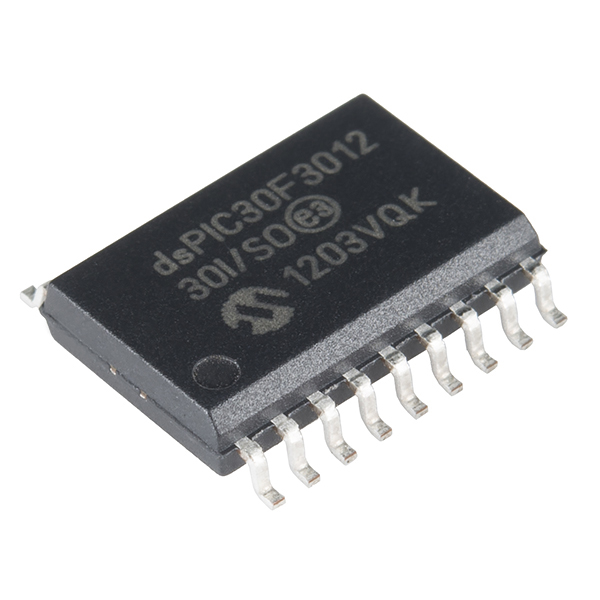 I'll probably run into precision issues again after the port, so I purchased an FPU coprocessor (I literally purchased the last one. I ordered two, but SparkFun delivered one and said they wouldn't be able to ship the other as the manufacturer discontinued this line). The coprocessor has some additional memory for Math routines and will speed up floating point computations tremendously. I imagine I can implement float-float arithmetic on it to get hardware supported float ops and pseudo hardware supported double ops, all without taking up my precious reserve of 2048 bytes or taking too long to compute.
Now I know what your thinking.. "Nick, if you are having this much trouble, why not just ditch the Arduino Fio and go for something beefier, like a Raspberry Pi?" Well, I have a pi sitting on my desk and I'd love to throw it on the rig and just use its compute power right away. I don't deter easily, however, and I'd much rather continue running up against these embedded systems constraints. This project is as much a learning experience for me as it is a desire to solve a problem. I'm actually happy that I've found a reason to play with an FPU coprocessor! Though from what I've been hearing, I'll probably need to move to Kalman filters eventually, so this is probably a moot point. Still, I'd rather not back down from what seems to be a treasure trove of experience.
In Summary
At a high level, it might look like I barely moved the needle towards my final goal. However, I learned a lot of valuable lessons after hitting all of these speed bumps. Going into this project, I assumed I could get away with my initial hardware choices as things like Ardupilot existed and the internet collective wasn't very specific on whether or not an Atmel 328P would suffice. Now I know better and can more adequately anticipate computational complexity and match the required compute power to my project's needs. Also, I learned tons of new debugging techniques that are pretty exclusive to the world of embedded development.I want to continue hacking on this quaternion implementation and see if I can get everything to eventually fit onto the flight computer. I might also start hacking on the iPhone/Android app and transponder to see if I can get some simple app connectivity to the quad. This isn't necessary now but it is fun and will be required when I'm flying and can't bring a laptop with me easily.
Happy hacking! - Nick
Monday, January 6, 2014
My UAV Project: Part 2
Hey folks, it's been a month, so it's time for another update!
I've been polishing the work since v0.0.2 (roughly last post) and adding a few extra features in preparation for my first hover tests. There was a bit of a lull the first couple of weeks of December as real work and externalities sort of took over, pre-xmas season. I was able to make up for that, however, with some pretty good progress over winter break.


Wanting to protect myself from aberrant code and mechanical failures, I finally built a remote kill switch (pictured below). It acts as an intermediate between the battery and the rest of the quad. It's a simple EC5 connector that's hooked up to a vibration resistant electromechanical relay that's hooked up to a 10 foot cable with a simple battery and toggle button at the end. It gives me some serious peace of mind when running new code. It was invaluable when testing single axis stabilization (described below). In addition, I no longer have to plug and unplug when testing code and writing code, respectively. It provides a convenience that I now wonder how I ever lived without.

I also threw together a simple voltage divider to allow for reading the battery level (described below).

To achieve these latency and reliability goals, I had to determine optimal radio configuration to allow for the highest reliability possible. Anything less than 100% reliability would severely impact my ability to test the control code remotely. This was a real pain as I was led down the wrong path a few times. In particular, many folks online said that a serial bit rate of 115200 worked great for them and their XBee projects, and since I wanted a faster RTT, I did all my initial tuning assuming 115200 was feasible.
As always, carefully reading through the datasheets revealed the source of errors I'd been seeing. After thoroughly reading through the XBee documentation, I learned that setting the baud rate to 115200 (via AT command `ATBD 7`) didn't actually set the baudrate to 115200, but to a slightly lower baudrate of 111111. This still divides nicely into any standard 16Mhz oscillator, but a good number of the packets were being dropped (I was only achieving ~90%) because the software was assuming a 115200 and not 111111 (seriously.. what? Elsewhere in the docs it references 115200). Setting the serial rates (hardware and software) to anything from 9600 to 57600 provided way more reliability. Having this assumption overturned was pretty upsetting to find out about, but at the very least I got to thoroughly test my packeting code to deal with all of the messed up packets. This will be really important in the final product when the transponder and quad need to talk to one another continuously, so I'm glad I the work to make this link solid is done and out of the way.
The end result, again, was a cool and reliable 30ms from sensor read to throttle update. All the poking and prodding was definitely worth it.
The solution to my storage woes was to make use of PROGMEM, or an AVR specific, non-C keyword that indicates that something should be kept in flash space only. Since all debug calls went through the logger, I was able to add a single method that took this PROGMEM, flash pointer type. From there, using some AVR libs, I was easily able to bring that string temporarily into SRAM for writing out on the serial line. This allowed me to push all debug strings into program memory and save considerably on space in SRAM.
Fortunately, I was able to keep a lot of debug strings around. Unfortunately, I found that formatting the debug strings was somewhat limited as common methods like sprintf have their own, rather large buffers that permanently eat up RAM when included in one's code.
I added logging and stats tracking to assist with radio performance profiling. I finalized the packeting protocol, and it successfully protects against Serial stream corruption and dropped bytes.
Right now the UI is far from pretty, but it takes no time at all to create controls and diagnostics, so I'd consider that a definite win.
For example, it took no time at all to add a simple web interface for viewing the battery status. In fact, the entire battery feature only took about 2-3 hours to add the web control, add the ADC reader in the flight computer, add plumbing in the serial server, and construct the circuitry necessary to proportionally drop the voltage to something readable by a 3.3v ADC pin.


As for the control stuff, at some point I'll try to move away from generic gains and towards a physical model that calculates thrust and moment arms explicitly. Finally, I'd like to try out a more fundamentally sound means of calculating the process error as input to the control feedback loop.
If I can get away with it though, I'd like to get to simple, stable flight as soon as possible.
Stay tuned!
I've been polishing the work since v0.0.2 (roughly last post) and adding a few extra features in preparation for my first hover tests. There was a bit of a lull the first couple of weeks of December as real work and externalities sort of took over, pre-xmas season. I was able to make up for that, however, with some pretty good progress over winter break.
New Hardware
To physically restrain any bugs I might encounter, I rigged up an anti-takeoff frame that's weighted down with 20lbs. It has velcros that are easy to hook into and out of, and it's even fairly sturdy during transport.

Wanting to protect myself from aberrant code and mechanical failures, I finally built a remote kill switch (pictured below). It acts as an intermediate between the battery and the rest of the quad. It's a simple EC5 connector that's hooked up to a vibration resistant electromechanical relay that's hooked up to a 10 foot cable with a simple battery and toggle button at the end. It gives me some serious peace of mind when running new code. It was invaluable when testing single axis stabilization (described below). In addition, I no longer have to plug and unplug when testing code and writing code, respectively. It provides a convenience that I now wonder how I ever lived without.

I also threw together a simple voltage divider to allow for reading the battery level (described below).
Tuning
After getting the test harness built, the next step was to solidify the communication and tune the radios and sensors for remote, control algorithm development. Having a 100% reliable, 30ms round trip between reading sensors and setting motor speeds allowed for an acceptable phase delay which in turn allowed for remote prototyping of the control theory code. This was great as the theory was something I wasn't at all familiar with when starting this project. The ability to write and debug the control code remotely allowed for insanely fast iteration. It also really helped with ramping up on the theory quickly as I got to tweak the algorithms and see the effects nearly instantaneously.
To achieve these latency and reliability goals, I had to determine optimal radio configuration to allow for the highest reliability possible. Anything less than 100% reliability would severely impact my ability to test the control code remotely. This was a real pain as I was led down the wrong path a few times. In particular, many folks online said that a serial bit rate of 115200 worked great for them and their XBee projects, and since I wanted a faster RTT, I did all my initial tuning assuming 115200 was feasible.
As always, carefully reading through the datasheets revealed the source of errors I'd been seeing. After thoroughly reading through the XBee documentation, I learned that setting the baud rate to 115200 (via AT command `ATBD 7`) didn't actually set the baudrate to 115200, but to a slightly lower baudrate of 111111. This still divides nicely into any standard 16Mhz oscillator, but a good number of the packets were being dropped (I was only achieving ~90%) because the software was assuming a 115200 and not 111111 (seriously.. what? Elsewhere in the docs it references 115200). Setting the serial rates (hardware and software) to anything from 9600 to 57600 provided way more reliability. Having this assumption overturned was pretty upsetting to find out about, but at the very least I got to thoroughly test my packeting code to deal with all of the messed up packets. This will be really important in the final product when the transponder and quad need to talk to one another continuously, so I'm glad I the work to make this link solid is done and out of the way.
The end result, again, was a cool and reliable 30ms from sensor read to throttle update. All the poking and prodding was definitely worth it.
Constraints of the Embedded World
In the process of tuning the radios, I made heavy use of debug packets originating from the quad. With these debug packets came loads of debug strings in program memory. As the ATMega328P has 32KB of flash storage for code space, I wasn't too concerned with strings that I thought would be kept in and referenced from flash only. On the ATMega, however, the flash space, while being a legitimate address space, is inaccessible from the code's POV. As a result, any data referenced from code gets copied into the pitiful 2K of SRAM on program load. Of course, I only found this after adding one too many debug statements and having the FC start resetting randomly. After hunting down the erroneous line of code and finding a wandering point of failure, a quick search pointed me to consider my SRAM memory usage.The solution to my storage woes was to make use of PROGMEM, or an AVR specific, non-C keyword that indicates that something should be kept in flash space only. Since all debug calls went through the logger, I was able to add a single method that took this PROGMEM, flash pointer type. From there, using some AVR libs, I was easily able to bring that string temporarily into SRAM for writing out on the serial line. This allowed me to push all debug strings into program memory and save considerably on space in SRAM.
Fortunately, I was able to keep a lot of debug strings around. Unfortunately, I found that formatting the debug strings was somewhat limited as common methods like sprintf have their own, rather large buffers that permanently eat up RAM when included in one's code.
Flight Computer Features
Safety was improved by powering down motors on startup and at other opportune times. I added logging and stats tracking to assist with radio performance profiling. I got to profile sensors to ensure faster read times. I also added and finalized on a UDP-like packeting protocol to protect against serial stream corruption and dropped bytes.Simple Client Features
The simple client was phased out in preference for the web client.Serial Server Features
The serial server was added as a local server to take RESTful web requests and forward them to the FC via the FC RPC command protocol.I added logging and stats tracking to assist with radio performance profiling. I finalized the packeting protocol, and it successfully protects against Serial stream corruption and dropped bytes.
Web Client Features
The web client has full E2E communication between javascript in the browser, coffeescript in the serial server, and the Flight Computer code. I can, for example, slowly blink the FC LED from javascript in the browser as a simple, visual health indicator. The web client can also read and display all sensors. It can read and display the battery status. It supports simple throttling to control the throttle to all motors. Finally, I was able to quickly integrate a LeapMotion to provide simple gesture based controls for testing of the single axis stabilization code (fortunately, this only took about ~30m to integrate!).Right now the UI is far from pretty, but it takes no time at all to create controls and diagnostics, so I'd consider that a definite win.
For example, it took no time at all to add a simple web interface for viewing the battery status. In fact, the entire battery feature only took about 2-3 hours to add the web control, add the ADC reader in the flight computer, add plumbing in the serial server, and construct the circuitry necessary to proportionally drop the voltage to something readable by a 3.3v ADC pin.

Latest Progress
These last few pictures demonstrate the quad's current ability to hold a target angle and angular rate. I'm currently in the process of tuning the control algorithm's gains to ensure a more prompt step response while minimizing overshooting the set point. There's been a lot of interesting Maths that have gone into this control, including a sensor fusing complementary filter for attitude estimation, and the PID controller itself.

Future Work
The majority of work that now remains mostly consists of higher level Mathematics and neato algorithms. The platform is mostly mature for now. I'd like to eventually make some custom PCBs to reduce the wiring in the project box, but that's a somewhat low priority item. I'll also eventually want to make an emergency parachute and release mechanism, but this won't be necessary until test flights that fly higher than what can be done near the ground (4-5 feet up).As for the control stuff, at some point I'll try to move away from generic gains and towards a physical model that calculates thrust and moment arms explicitly. Finally, I'd like to try out a more fundamentally sound means of calculating the process error as input to the control feedback loop.
If I can get away with it though, I'd like to get to simple, stable flight as soon as possible.
Stay tuned!
Thursday, December 5, 2013
My UAV Project: Part 1
I've been having a lot of fun on a side project of mine lately and wanted to share out what I've been doing, so here it goes!
At a high level, my goal has been automated aerial tracking and cinematography. Basically, I'm about halfway through my hang gliding license and I'd like to be able to share my love for flight with my friends and family via 1st person video and 3rd person video if possible.
Think something like this, but external to my glider and autonomous.
Yeah, I get the willies too just thinking about it.
So I've been researching and tinkering, designing and coding, and otherwise been having a blast with the construction of my new pet quad rotor, SkyCam. From a technical perspective, it's been tons of fun. I've designed and developed almost everything about the hardware platform from the bottom up and done so mostly from scratch. My progress is thus:

Here you see the quad, its restraining harness, a GoPro Hero3+, and a Raspberry Pi (for eventual video encoding and live streaming).
The only thing to come in a kit was the carbon fiber frame. Everything else has been off-the-shelf parts. There's been plenty of work just to get this up and running, but it's been pretty great so far.
For example, the motors didn't adapt to the frame's motor mounts, so I had some fun and milled the mounts to make appropriately dimensioned screw holes.

I also got to bust out my electronics skills. Any cabling or circuitry was built as needed to piece together the hardware. For instance, here's an over-voltage protection circuit to keep the microcontroller from getting fried.

All together, the system has been designed to optimize slightly for time. It's design has a theoretical flight time of anywhere from 20-30 minutes. The agility and carrying capacity are the other two main design parameters. The responsiveness is not acrobatic, but it's also not sluggish. The spare carrying capacity will be somewhere around 400-600 grams. Also, the top speed of the quad must be great enough, and will be, to keep up with the glider. (My glider typically cruises at around 35mph)
On the software side of things, I've been writing all the code from scratch as well. I could have just as easily taken some pre-existing code and adapted it to my platform, but I wanted something truly custom that I built myself. This project is as much about solving the problem of autonomous 3rd party video as it is about learning to design robust embedded systems and UAV solutions.
The software is built on top of off-the-shelf hardware. I've worked with cross compilers/toolchains for embedded systems in the past, so I went the easier route of using Arduino related technology for my flight controller. The sensors are also COTS.
Computing platform(s):
Quad:
- Arduino Fio
- XBee 802.15.4 Pro wireless
- Parallax: Altimeter, Compass, Gyroscope, and Accelerometer
- GPS
Transponder (relays my position to the quad):
- Arduino Fio
- XBee
- GPS
- Altimeter
My software currently features the following:
Flight computer:
- Sensor support
- Software safeguards
- Watchdog supported resets
- Radio out detection and handling
- UDP-like protocol for handling message communication
- RPC support
- Simple C/C++ code that adheres to the embedded principles laid out here
- Code optimized and hardware configured for low latency communication
- This enables fine grained remote control (Latencies low enough that the control algorithm can be run remotely, for instance)
Serial client
- Runs on node.js
- Written in coffee script
- Chosen for ease of expression and versatility
- Contains RPC client code
- Supports a RESTful interface to said client code
Web client
- Consumes the serial client's RESTful interface
- Displays diagnostic information about the quad
- Exposes basic control knobs and configuration via a convenient web GUI
Currently with all of this combined, my browser can make a request for the quad's sensor data and get it back with a round trip time of roughly 50ms.
Future work:
There's still plenty of work to be done. At present, I'm just about done wrapping up the latency optimizations and am about to start work on the control algorithm so I can get this bad boy up and hovering. Software safeguards are present as well as physical restraints to prevent undesired takeoffs in the event of bugs and otherwise poor code. But hovering and control parameter tuning is just the beginning. After that there are still a myriad of milestones I'd like to meet before demonstrating SkyCam as a solution to 3rd party tracking & filming.
My timeline up until now has been pretty fast paced but reasonable. Here are some of the highlights:
- 9/21/2013 - Decided to start this project while browsing through components at Frys
- 9/29/2013 - Quad performance researched and designed. Parts ordered from everyone's favorite hobby wholesaler
- 10/2/2013+ - Parts start trickling in (wireless, battery)
- 10/16/2013 - Majority of parts arrive (frame, motors, charger, propellers)
- 10/27/2013 - Hardware platform's first E2E, remotely controlled, hand-stabilized flight.
- 11/5/2013 to now - Added all of the software features mentioned above
So far this project's been a blast! Keep posted and hopefully I'll have some hovering footage pretty soon.
Saturday, May 30, 2009
Real Mode
Ever wonder what it's like to run without hardware protection? Want to have direct access to all attached peripherals and disks directly? Enter real mode, an IA32 specific feature introduced with the 80286. This actually wasn't a new feature at that point, since the 80186 and the 8086 also had real mode. Rather, the 80286 introduced the distinction of real mode and protected mode.
http://en.wikipedia.org/wiki/Real_mode
I found it funny that in IA32, you can go from protected mode to real mode by resetting and keeping the contents of RAM alive. What a hack!
With real mode, you can't (shouldn't) access non-8086 extensions because it's nice to be backwards compatible. That being said, you really only have the basic ops available to you in real mode. That means no MMX or SSE for your homebrew BIOS =(
Interesting stuff =)
http://en.wikipedia.org/wiki/Real_mode
I found it funny that in IA32, you can go from protected mode to real mode by resetting and keeping the contents of RAM alive. What a hack!
With real mode, you can't (shouldn't) access non-8086 extensions because it's nice to be backwards compatible. That being said, you really only have the basic ops available to you in real mode. That means no MMX or SSE for your homebrew BIOS =(
Interesting stuff =)
Subscribe to:
Posts (Atom)